Equipment
DREADMOOR How to Heal: First Aid Kits and Resting
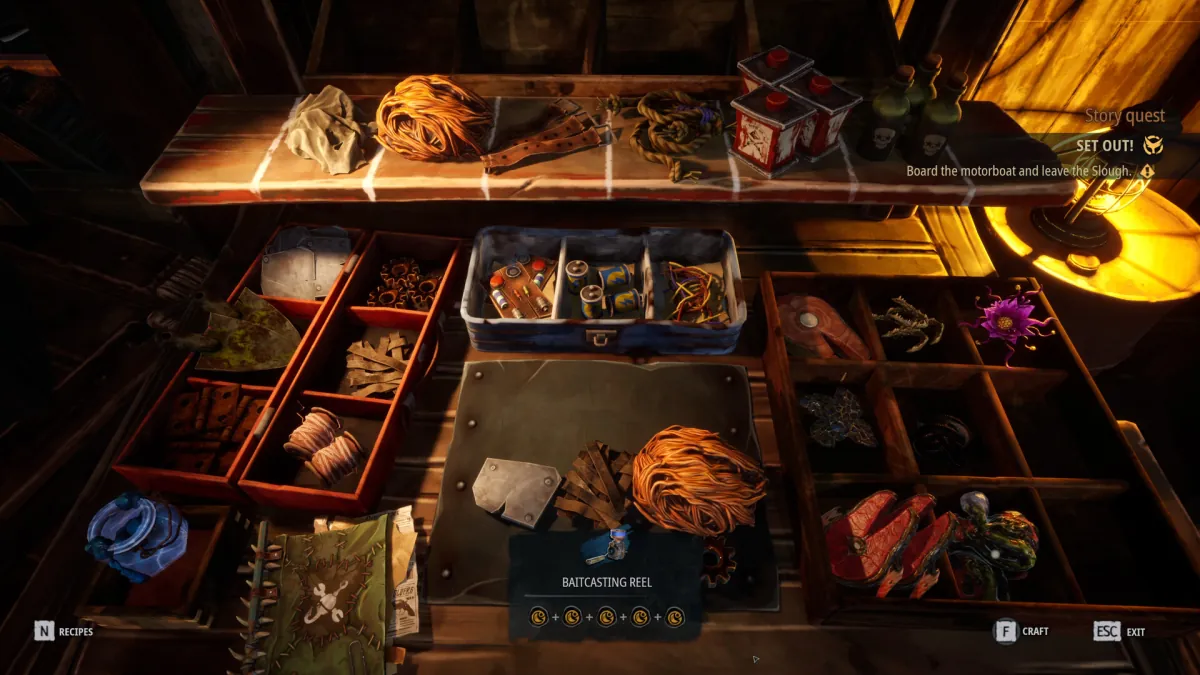
To restore Malcolm’s health in DREADMOOR, select the First Aid Kit in your consumable slot and use it like an equipped tool. A launch-day player who could not find the kit in the regular inventory discovered that collected kits went straight to that slot. Resting also restored health for players in the same Early Access discussion, so a bed at the Trading Post is another option when you can get back safely. If your journal says First Aid, take a kit to the sick Fuel Larva at the Big Hollow Trading Post. Early Access player reports First Aid quest
How to use a First Aid Kit on yourself
Move out of immediate danger and look at your tool and consumable slots. Select the First Aid Kit from the consumable slot, then activate it the way you use an equipped tool, following the button prompt in your current control layout. If you picked a kit up but do not see it among the loose materials, check the consumable slot before going back to the workbench. The launch-week account confirms that route to the kit, but does not establish a fixed keyboard shortcut or controller button. Player report on the consumable slot
Check Malcolm’s health bar after using the kit. The game describes the First Aid Kit as an emergency consumable for wounds and physical injuries, and the Early Access game-data guide identifies the action as Heal. The sources do not give a verified amount of health restored per kit, so check the bar before returning to the same fight. A November player also reported taking damage aboard a well-armored boat, so a healthy hull is a poor way to judge how much health Malcolm has left. Versioned item data Player report about damage on board
After you unlock the Crude Lockpick, check if your consumable space is occupied before leaving the hub. A launch-week walkthrough reports that lockpicks share space with First Aid Kits. If you are setting out to fight rather than search locked containers, check which consumable is selected and keep a kit accessible before you board. Launch-week equipment walkthrough
Where to get the First Aid Kit recipe
The main story supplies the recipe when you reach the Big Hollow Trading Post, beyond the sluice gate at The Throat. Answer the Baron’s radio call on arrival, then follow the objective to the new Trading Post and speak to Gill and Bozur inside Betsy. They ask you to treat the Fuel Larva and provide the kit recipe. A kit you already have can be used for the same objective, so check your supplies before spending the materials. Screenshot walkthrough for Big Hollow
One kit costs one Alcohol, one Rusty Hinge, and one Mutant Fish Meat at a Craft Table. Open the First Aid Kit recipe at the workbench, place its three ingredients in the crafting area and follow the displayed crafting input. The game-data guide lists left-click to place a resource and hold F to craft in the documented mouse and keyboard setup. Use the labels in your own layout if you have rebound those actions or play with a controller. Versioned recipe Crafting controls
What to gather if a recipe ingredient is missing
Look for Alcohol and Rusty Hinge among the materials you pick up during exploration, and check their names when loading the recipe. Ordinary Fish Meat is common if you have been preparing boat fuel, but the kit asks specifically for Mutant Fish Meat. Process a mutant fish that yields that material in the Grinder, then bring the meat to the Craft Table. If your current trip only needs the larva treatment and you want to carry a spare for Malcolm, making both kits requires two of each ingredient. Alcohol pickups Rusty Hinge pickups Mutant meat sources
Check whether you already have mutant meat from a previous catch before planning another night trip. Both Cryptmaw and Glowbug can yield it, and each has its own fishing requirements and story context. Mad Nick’s Cryptmaw request comes after the larva objective, so keep the fish you need for that turn-in whole when you get there. The fishing guide explains how to match the bait and retrieve to a shoal when you go looking for more materials. Fish grinder output by species Big Hollow quest order
Where to apply the kit to the Fuel Larva
With First Aid active and a kit available, go to the sick Fuel Larva at the Big Hollow Trading Post, by the fuel setup. Approach the larva itself and aim at it until the treatment interaction appears, then use the displayed input. Check the journal after the interaction, since the next part of the walkthrough sends you to catch a Bellybulge and a Toadling. Steam lists Don’t Bite the Hand That Fuels You for curing the larva. Big Hollow walkthrough Official achievement
If the treatment prompt is missing, first confirm that you are at the second Trading Post, that Gill and Bozur have assigned First Aid, and that you have the finished kit rather than just the materials. A launch-week player reported both a missing marker and a missing interaction on the quest larva, with no verified fix in the thread. Follow the journal instead of consuming extra kits on yourself while trying to advance the quest. Once the larva is treated, ordinary boat refuelling still requires feeding the larva and transferring the fuel through the nozzle. Missing quest interaction report Fuel Larva and refuelling steps
What resting and Estelle can do
If you have no kit on hand and can retreat, use an available bed at the Trading Post and compare your health before and after sleeping. One launch-day player reported that resting restored all the health they had lost, and another used sleep as their way to heal. The patch notes discuss sleep timing and where the player stands after getting out of bed, with no fixed healing amount or guaranteed result for every bed. If your health stays low after resting, keep the next trip short or spend a kit before re-entering danger. Player reports on resting Official Early Access updates
Estelle is a healer in the story and a radio contact in the quest The Healer. Her confirmed later role is to send you to Bone Reef for recordings and help you obtain the real Essence recipe. The game describes Essence as a way to temporarily suppress the Sickness, which is separate from a wound treated with a First Aid Kit. No repeatable player HP service from Estelle has been verified, so look to the kit or a bed when you need to recover from a fight. Estelle in the Early Access walkthrough Wounds and the Sickness
Check the hull and save before going back out
After an attack, check Malcolm’s health, the hull and the fuel level independently. For hull damage, the Early Access walkthrough shows using Bug Slime in the Repair Gun at the Dry Dock. For a low tank, use the fuelling equipment at the Trading Post and check the tank after transferring fuel. Update 5 added a warning effect before incoming tentacle attacks, but after a hit the player health bar still tells you whether Malcolm needs treatment. Dry Dock repair walkthrough Official Early Access updates
The developer FAQ says that dying, including when your ship is destroyed, returns you to the most recent save and rolls back the progress made since then. Use Save Game when it is available after recovering, crafting supplies, or completing First Aid. Early Access Update 5 documents a temporary saving restriction around a gate puzzle cutscene, so check that the command actually completes before leaving a milestone behind. If you already died, look at the restored quest and inventory state before crafting or travelling again. Developer FAQ on death Official Update 5