Equipment
DREADMOOR Lockpick Guide: Craft and Open Doors
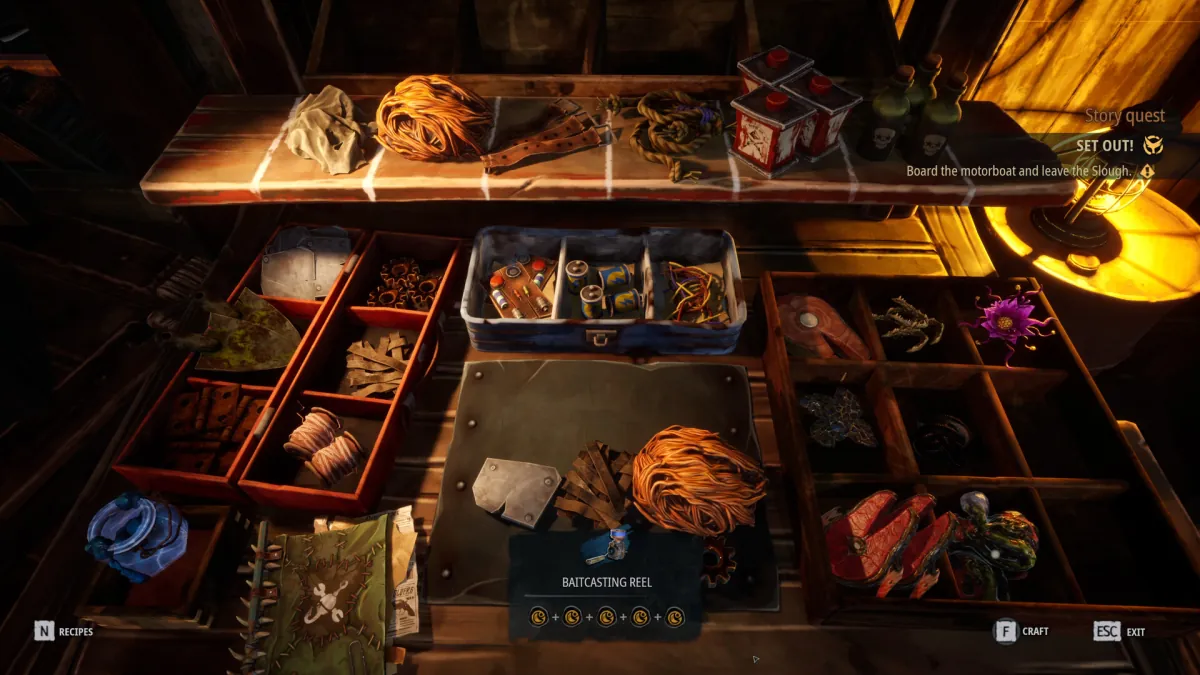
To get your first DREADMOOR lockpick, finish Mad Nick’s Cryptmaw assignment and collect the Crude Lockpick recipe. Use one Rubber and one Metal Plate at a Craft Table to make each pick in the documented Early Access version. Your first story use is the locked Drying House control-room door, which gives you access to the sluice controls.
Unlock the recipe through Mad Nick
The recipe is tied to the story encounter at the Big Hollow, after you have started investigating the Drying House. Speak to the traders and follow the dialogue about getting past its locked control-room door. Continue with the objective that sends you to Mad Nick rather than looking for a recipe at the first workbench you encounter.
Nick’s assignment takes you to a mutant fishing spot, where the target is Cryptmaw. The fish is available at night, and its quest spot expects stronger line than the starter setup. Start with the Cryptmaw guide if your log is still asking for the catch or your line cannot handle the spot.
The story walkthrough with screenshots shows Nick handing over the recipe after the fish are delivered. Go back to him with the catch when the objective is complete. If you spoke to Nick before receiving this task, return after advancing the Drying House conversation and check for the fishing objective before making another trip.
Craft the Crude Lockpick at a Craft Table
Open the Craft Table and select Crude Lockpick from the available recipes. In the documented recipe, one pick costs one Rubber and one Metal Plate. The Early Access recipe listing and the in-game screenshot walkthrough agree on these ingredients.
The quest index for Early Access shows a later objective called Craft Lockpicks, with a target of three. When that objective appears in your own log, ready enough Rubber and Metal Plate to complete the requested batch. Keep a spare for a failed attempt if you expect to practice at the lock before opening the story door.
Use the item names in the recipe when deciding what to keep from a salvage trip. Metal Plate is the metal ingredient for the basic pick, while Bone Plate is a separate material. If the correct ingredients are present but the recipe is missing, check Nick’s hand-in and the Craft Table before treating it as a shortage.
Use the training padlock before the story door
The walkthrough shows practice padlocks near Nick’s table. Use a practice lock to read the on-screen instructions if this is your first attempt. It gives you a place to learn how the turning motion works before you leave for the Drying House.
On the documented mouse-and-keyboard setup, move the mouse to adjust the pick’s angle until the lock gives the visual cue for the right position. Hold D to turn the mechanism while keeping the pick in that position. Destructoid’s gameplay screenshot shows the cue and the minigame controls.
Release the turn input and reposition the pick if it begins to bind. Forcing the mechanism can break the pick, leaving you to start the attempt again with another one. If you changed the bindings or use a controller, follow the controls displayed in the game rather than looking for the keyboard letter on your device.
Open the Drying House control room
Follow the quest marker to the Drying House area and moor near the way up to the control room. The door you need is the one that blocks access to the sluice control panel. Open it with the Crude Lockpick and enter the room before returning to the boat.
Opening the door and opening the waterway are separate steps. Inside the control room, operate the panel and solve the gate’s symbol sequence, using the clues in the room and the current quest instructions. When the passage opens, sail through and moor on the other side to continue.
The walkthrough shows a Harpoon Gun in a cabin reached after passing the gate. If your log has moved on to repairing machinery or clearing blight, read the new objective before crafting another pick. The story proceeds through several interactions in this area, and each has its own prompt.
Tell a pickable lock from a key or power gate
A padlock or pickable door should provide a lockpicking interaction when you examine it. Other barriers can require a named key, a powered mechanism, or a step of the story before they open. The documented key and door listing illustrates these different barriers across the settlements.
At The Throat, checking the local mechanism may matter more than making another tool. If a generator or pumping machine needs attention, follow the Fuel Can and generator guide and compare the objective shown in your save. Use the area and landmark guide to identify which route or barrier your current objective refers to.
Decide when to research a stronger lockpick
Early Access item listings show three related tools: Crude Lockpick, the standard iron Lockpick, and Master Lockpick. The advanced picks have their own unlocks and recipes in the tools tree. For the Drying House story door, start with the crude version the quest teaches you to make.
The versioned crafting catalog lists one Rope, two Metal Plates, and two Coral Fibers for the standard Lockpick. It lists two Metal Plates, two Chromatic Scales, and one Bug Slime for the Master Lockpick. A separate recipe extraction reports the same quantities, so these are useful for planning if your Craft Table still displays those recipes.
The tools tree shows the progression from Crude Lockpick to Lockpick, then to Master Lockpick. If the next recipe is grayed out, check the preceding tool and required blueprint before gathering another set of parts. You can compare these requirements in the tools tree without consuming your supplies.
If you begin revisiting optional locked containers, consult the tools tree and compare the recipe at your Craft Table before committing materials to an upgrade. The progress you have made in the current save determines which recipes you can see. Early guides written before the story release may describe a version in which parts of that upgrade tree were visible without an accessible quest route.
Troubleshoot a door that still will not open
Start with the active objective and the name of the door. Recheck the fish hand-in if the blueprint is missing, the item names if the recipe cannot complete, and your inventory if the minigame wants a usable pick. If a specific door gives a key or power prompt instead, resolve that requirement first.
The official Early Access patch notes document a padlock interaction fix in Update 6. If your input stops responding instead of simply failing the minigame, check your build and note which door and quest step were involved. The DREADMOOR save guide explains how to keep a manual save before retrying a quest interaction.